Brilliant for 50 rows. Row 5,000 is another story.
Turn a prompt that works into a production table that keeps updating — every row settled, no mixed versions.
Columns your data never had. Your agent grows the column your source never had, a batch at a time, and
it lands where downstream can use it — the line's state lives on the server, not in its
context, so it keeps producing after the session ends. Every attempt lands on one ledger.
115 raw → 62 clean → 62 leased to disk → submitted → refused →
attempt 2 continued the same batch from server-side state, not a new run →
62 landed · recorded with gate: on →
Session replay · recorded 2026-07-28claude-code + tablize skill
>
Production line · Supplier screening = tablize lineage■Up to date
3 tables
Collection ┄ off-ledger
Source
Supplier listings · raw
115rows
append-only · duplicates kept
dedupe by url
−53 folded
Processing
Supplier listings · clean
62rows
first-seen wins · stable ids
AI extraction
by your agent
Process table
Supplier category
124records
every attempt on the books
Accepted · lens■62 acceptedclaude-sonnet-4.5 · attempt 2a view of the process table — not a fourth table
golden gate
4 hidden goldens · gate: on
■4/4 · attempt 2
62 through · 62 blocked writes
Consumption ┄ off-ledger
Real run — a local instance, 2026-07-28. Supplier listings are
sample data; every count, verdict, model and batch id replayed here is the product's own
recorded state. This run was recorded with the gate on — build a line without a golden
file and it runs at none instead: no verdict, rows land unaccepted,
and the batch flow above works exactly the same. The three modes →.
This drawing is in the website's own
type system — the product's own UI looks like this ↓.
✓62 landed on attempt 2 of the same batch — the run continued from server-side state instead of restarting.Install for your agent
Where it runs
On your machine, with your model key. Tablize supplies no model and no runtime.
What your agent holds at once
One leased batch, never the whole table. The rows it is not working on stay on the
server, so its attention does not thin out as the table grows.
What happens tomorrow
The next session resumes the run — open batches, leases, verdicts — instead of
reconstructing it from a transcript.
What the gate is for
No goldens, no gate. Supply a golden file and a check the agent cannot read judges every
batch — one miss refuses the whole batch, and every refusal stays on the books.
01 / Install
Give your agent a pipeline that outlives the chat.
Four commands. You sign in once in the browser to pair, no dashboard tour, and no long-lived key
pasted into a terminal.
~/your-project · setup
$ npm i -g @tablize/cli
$ tablize install
$ tablize login --url https://api.tablize.com
$ tablize doctor
Prompt for Claude Code / Codex
Set up Tablize as the durable pipeline for this project's clean → extract → accept work. The point is that the process state lives on the server, not in your context.

1. Run `npm i -g @tablize/cli`, then `tablize install` to lay down the bundled agent skill.
2. Run `tablize login --url https://api.tablize.com` and ask me to approve the browser pairing.
3. Run `tablize doctor` and fix any version, skill, server, or workspace mismatch.
4. Inspect this project and propose the raw evidence contract and the extraction result schema before creating a pipeline.
5. For the first run, create the extraction edge with no golden file — it runs at `none`: nothing judged, rows land unaccepted. Do not invent goldens just to fill a field.
6. Work in small batches: `batch pull`, compute, `batch submit`, repeat. Never load the whole table into your context, and resume from `tablize context` rather than from this conversation.
7. Read `gateMode` from `tablize transform show <addr>` before you trust a row: only `enforce` marks a row accepted. The gate can be moved later — `tablize transform gate <addr> --mode enforce --reason "…"` does not rebuild the line, does not bump the recipe version, and leaves finished work exactly where it is; `enforce` and `observe` need goldens pinned first. Propose the move when the pipeline is worth protecting, and ask me first, because I sign the goldens, not you.
8. Never move the gate down to `none` to escape goldens a line keeps failing. That is the gate doing its job.
9. Keep collection completeness and downstream consumption explicitly outside Tablize's guarantee.
Why pairing rather than an API key field: the commands here are
driven by agents as often as by people, and an agent has no browser and no password. Pairing
gets it a working credential with one human click — and the secret never appears in a web
page, a clipboard, or your shell history.
What actually happens · real CLI and browser output
01
The terminal prints a short code and waits.
🔐 Sign in to tablize
Opening: https://app.tablize.com/cli-login?code=…Confirm this code matches: BFTK-9QDX
Waiting for approval....
Nothing is granted yet. The request expires on its own if nobody
approves it.
02
The browser names the client and the exact grant.
Sign in to tablize?A command-line client is asking to connect to your account.
Client tablize CLI · your-mac · you
Code BFTK-9QDXWhat it will be able to do
Read and write your data. It cannot manage
members, policies or billing, and it does not
expire — revoke it any time in Profile → API keys.
[ Approve ] [ Refuse ]
You compare the code against your own terminal before approving.
Refuse grants nothing and tells the waiting terminal to stop.
03
The CLI receives the key, and doctor checks three layers.
$ tablize doctor
{
  "summary": { "ok": 9, "warn": 0, "fail": 0 },
  "message": "all three layers healthy against
     https://api.tablize.com (9 ok, 0 warn) —
     this verdict covers that server only",
  "next": "tablize context   # rehydrate against
     https://api.tablize.com: open tasks, recipes,
     rules. Checking a different server?
     tablize doctor --url <other>"
}
Installed == running? Skill == CLI? Server capabilities online?
Any failing check comes back with the exact fix command
attached, so the agent can repair it without asking you.
02 / Why now
Columns that never existed.
An LLM can read what only people could read, and answer with a column that
never existed: manufacturer or trader, standard clause or risky one.
New dimensions, at scale.
But a dimension only pays once it lands in the pipeline — a real column you can join,
filter and build on, not an answer that evaporates with the chat. And producing columns
at scale is production: it needs batches that resume, an acceptance gate, and a ledger of
who produced what, under which rule.
That is Tablize — where the new dimensions land, and the account
that makes them safe to build on.
The supplier table grows a category column — written by your agent,
judged at the gate.
The same run, in the application, recorded with the gate on
(enforce) — that is what makes a refusal visible at all.
Unretouched, at 100% zoom, cropped only where each header says so.
A / The line
Accepted output stays attached to its source.
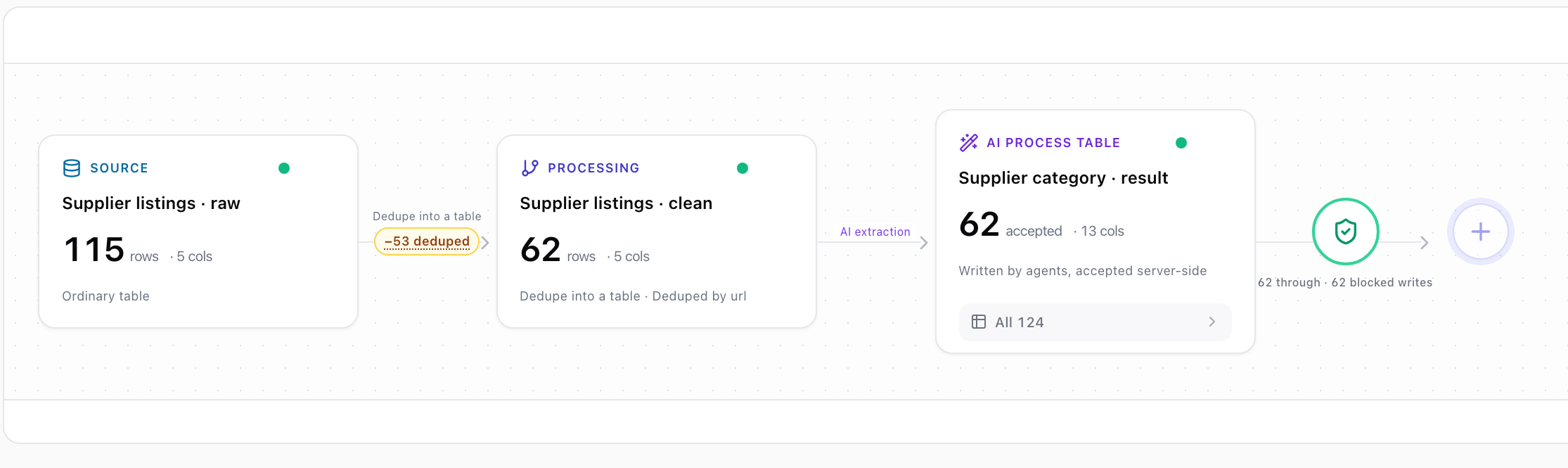
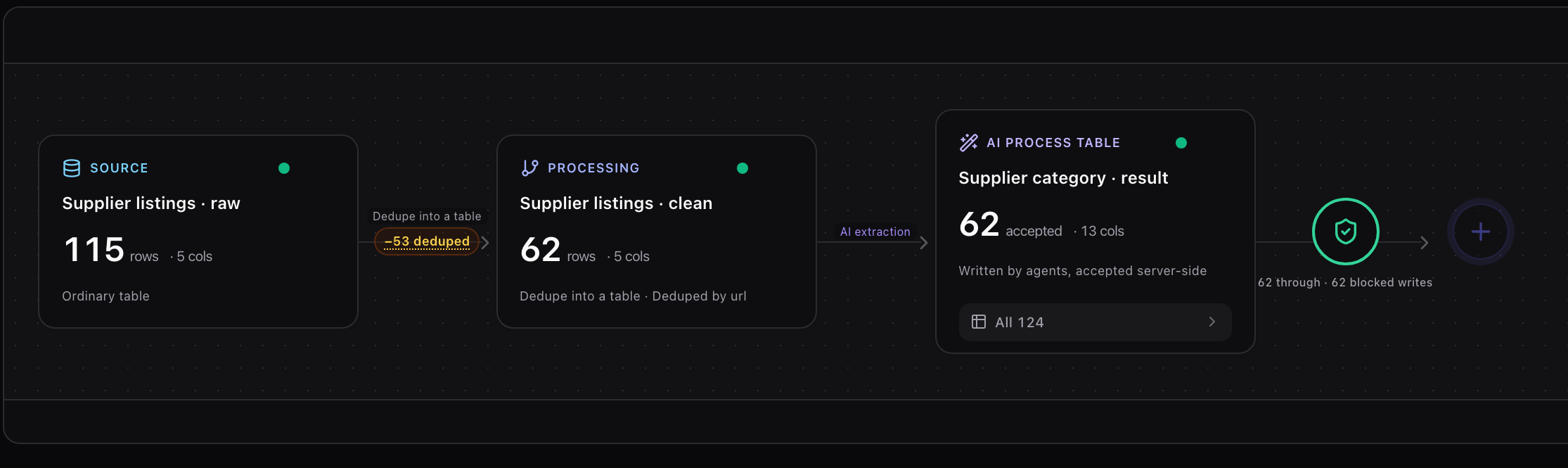
The whole edge on one canvas: 115 raw rows, 53 folded away by url, 62 clean rows, the
extraction, and the gate.
The label on the edge leaving the gate is the product's own, not a caption we wrote:
62 through · 62 blocked writes. Recorded but not promoted, drawn on the line itself.
115 → −53 → 62 → 62 accepted, and on the gate edge:
62 through · 62 blocked writes. The product has both themes too —
this shot follows whichever one you picked above.
B / Batch ledger
Every attempt keeps its identity.
One row carries the whole account of a batch: its id, how many rows it leased, the hidden
check score, the model that produced it, and how many times it was submitted.
The status strip lists rejected 62 beside accepted 62. Rejection is a
first-class state here, not an error log to be cleared.
process table · batches and statuslight theme · cropped, no rows
62 rows · 4/4 · claude-sonnet-4.5 · 2 submissions — the accepted batch,
with the earlier rejection still counted in the same account.
Screenshots come from a local instance on 2026-07-28. The mechanism, ids,
counts, verdicts and system columns are the product's own state; the supplier rows are sample data
generated for that run. The batch-ledger shot exists only in the product's light theme and is shown
that way in both site themes — we would rather label a screenshot than retouch one. There are no
customer logos on this page because there is nothing to show yet.
04 / Is it for me?
Most data jobs need none of this.
One agent, one afternoon, cheap to be wrong — a CSV is the right answer and this
is overhead. Check what is actually true of your workflow.
Conditions true
0of 10
□ Not yet answered
Check the statements that describe your workflow. The
result is a recommendation, and one of the three is "don't use this".
Next step — read the boundary below before you install
anything.
05 / Honest boundary
What a landed row does and does not mean.
The most load-bearing section on this page. An account that overstates its own
scope is worse than no account, because people stop checking the part it never covered.
The account covers the middle. Both ends stay yours.
Inside the edge
Tablize guarantees
■
A row marked accepted passed the rules and check rows as they existed at that moment,
and the version is recorded. A row marked unverified was never
judged — the label tells you which you have.
Outside the edge
Tablize does not guarantee
×
That anyone used the accepted result. In our own first end-to-end tenant,
128 of 136 accepted rows were never picked up by anything downstream — five rounds,
unnoticed, while the ledger stayed green the whole time.
Same engine on every tier — you only move up a rung when the line does. The ledger is the meter, and it counts columns delivered, not effort spent: retries and refused batches never count. Paid plans aren’t open yet: during the public beta nothing is charged and no per-unit price is set.